From finding to Jira ticket in one click
A scanner reports a vulnerability. Now what? In many teams this is where the manual work starts: look up the CVE, find the affected version, write a ticket, paste the link, assign someone. Secupipe does those steps for you. Every finding comes with everything your team needs to decide, and turns into a Jira ticket with one click.
What a finding looks like in Secupipe
Secupipe continuously matches the SBOMs from your pipelines against vulnerability databases. When a known vulnerability hits one of your components, a finding is created. The example below comes from one of our own projects: the Go library golang.org/x/crypto contains the openpgp package, which is no longer maintained. The OSV database lists it as GO-2026-5932.
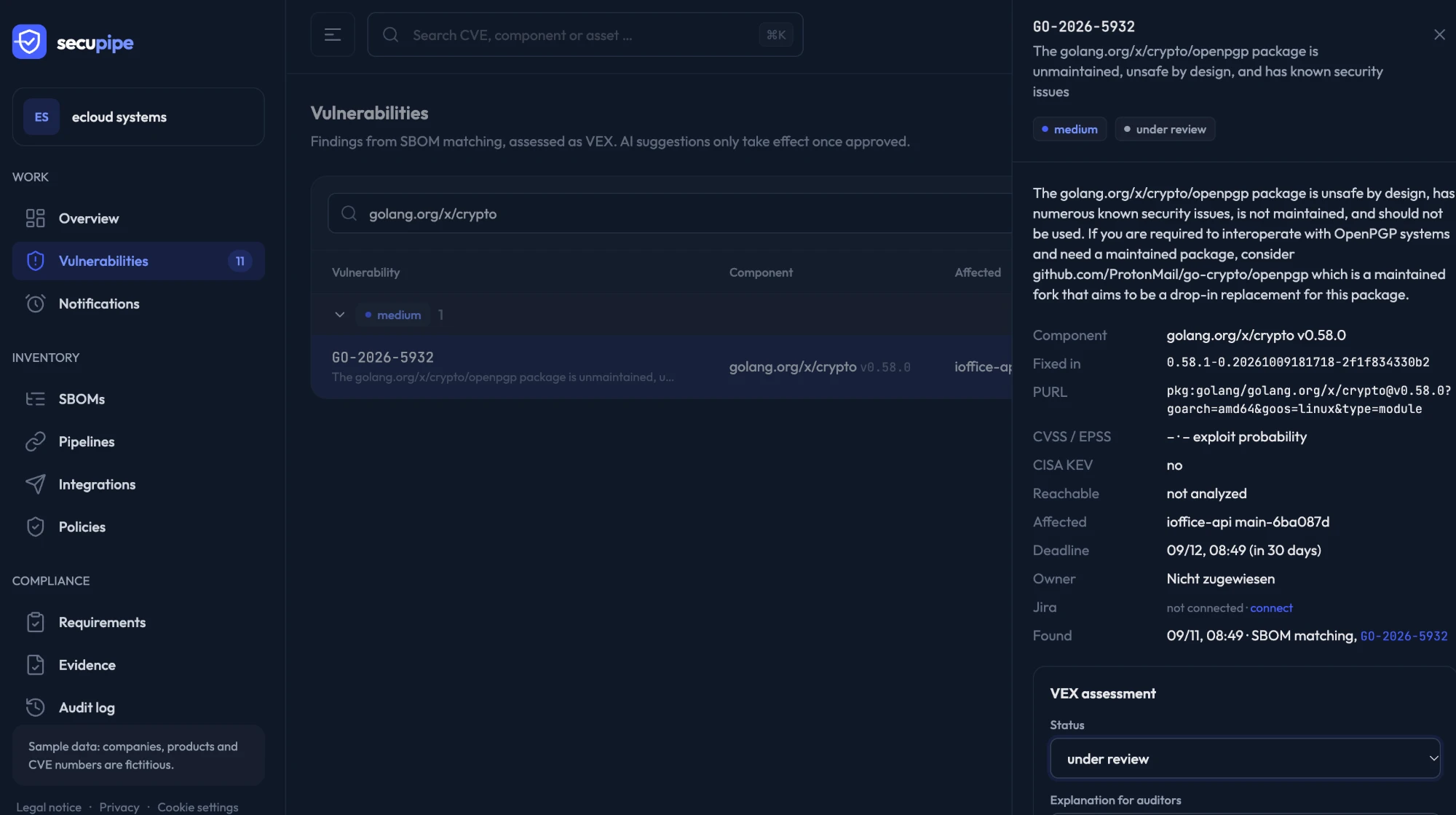
What a finding tells you
- What is the problem? The description from the vulnerability database, with a link to the source on OSV.
- Where is it? Component with version and package URL (PURL), plus the artifacts that contain it, such as
ioffice-api main-6ba087d. So you see which build from which commit is affected. - How do I fix it? The version in which the vulnerability is fixed. Usually a dependency update is enough.
- How urgent is it? CVSS score, exploit probability according to EPSS, and whether CISA lists it in the KEV catalog, i.e. it is already actively exploited.
- By when? Every finding gets an assessment deadline: 24 hours for actively exploited vulnerabilities, 7 days for critical, 14 for high, 30 for medium and 90 days for low.
- Who owns it? Owner and history, so nothing gets dropped.
Assess, don’t just list: VEX
Not every reported vulnerability actually affects your product. Maybe the vulnerable code is never called, or the component only ships in a build tool. That is why you assess every finding in VEX format (Vulnerability Exploitability eXchange): under review, affected, not affected with a CISA justification, or fixed, plus an explanation for auditors. Every assessment is logged with name and time and can be exported as a VEX document. That is exactly the evidence customers, auditors and the Cyber Resilience Act expect.
One click to a Jira ticket
When a finding matters, it belongs where your team already works. Instead of copying information by hand, click Create ticket in the finding. Secupipe creates the ticket directly in your Jira project:
- Summary: ID, component and version, for example
GO-2026-5932 in golang.org/x/crypto v0.58.0. - Description: severity, a note if it is actively exploited, fixed version, affected artifacts, the vulnerability description and a link back to the finding in Secupipe.
- Labels
secupipeandschwachstelle, so security tickets are easy to find in boards and filters.
The ticket key then appears as a link in the finding. Anyone looking in Secupipe gets straight to the ticket, and anyone working the ticket gets straight back to all the facts.
Or fully automatic
If you like, Secupipe creates tickets on its own: under Integrations you pick a minimum severity, say “high”, and every new finding at or above it becomes a ticket right away, whether it appears when an SBOM is uploaded or during the regular re-check when a new vulnerability is published. Jira Cloud (email and API token) and Jira Data Center (personal access token) are supported. You choose the issue type, such as Task or Bug.
Why it matters
Since 11 September 2026, manufacturers must report actively exploited vulnerabilities under the Cyber Resilience Act within 24 hours (more in our article CRA reporting obligation applies since 11 September 2026). Finding vulnerabilities is not enough for that. They have to be assessed, assigned and handled in a way you can prove. In Secupipe the path from finding to VEX assessment to ticket is fully logged.
How to start
- Create a free account and upload an SBOM or connect a pipeline. Findings and VEX assessments are included in the Free plan.
- For Jira, on the Team plan, enter your Jira address, a project and a token under Integrations.
- Click Create ticket in a finding, or pick a minimum severity for automatic tickets.